Manga Monday (cough): 100% Perfect Girl

Tuesday, May 11, 2010


I missed the second Manga Monday. Shame on me! I had a job interview during the time I usually spend blogging. I won't say where it was but it starts with a 'D' and ends with a 'land,' and, yes, it went well.

100% Perfect Girl
Downloaded from Goldlily's Media Gallery ~
Mangaka Wann
Genre(s) action,  drama,  mature,  psychological,  romance, shōjo
Year 2007
Volumes 11
Summary  Taken From Netcomics
Jay Jin is the headstrong teenage rebel, determined to prove she's serious about making art. J. Max is the tall debonair foreigner, in Korea on business, with more--much more--to his background than he lets on. On the surface, it would seem as though Jay and J. have nothing in common... until a chance encounter in a hotel lobby sparks a mysterious attraction. Will true love prove strong enough to overcome the language barrier, not to mention the thousands of miles separating two attractive people? Then there are the interventions of friends and family who think they know best... as well as a disastrous encounter with spicy chicken kebab!

Scanlated by Netcomics
Translation A+
Scan Quality A+
Editing Quality A+

Review
This one took me awhile to finish. Eleven volumes is pretty long! That said, it is a fabulous manga (technically manwha). Many romance mangas tend to either drag out the development of the relationship and consider the beginning of the romantic relationship to be the end of the manga (And their romantic relationship finally begins, tra la la, The End), which I hate because that's really not the end for anyone. Others get the main couple together towards the beginning, and then the story focuses on things outside of the relationship (like in Akkan Baby, where the story was way too focused on the principal). This is one of those few mangas that has a nice balance of story. And it's pretty. The angst can get a bit over the top, but I think it's more reasonable than most storylines.
Story  
Art    


Download in .PDF format
Note: This manga is split up into eleven PDFs (one per volume).
Read online at BleachExile.com


Nook Wallpapers: Twilight

Friday, May 07, 2010

I've got eight more Nook wallpapers to share! This time the subject is The Twilight Saga, which is a guilty pleasure of mine. I know, it's horrible and every character deserves to be hit by a car. It's nearly unbearably cheesy and nothing of substance ever happens with what would potentially be a good plot (eg, the Volturi). Not to mention... Renesmee. Ugh. But if it's one thing ladies love it's sexual tension, and that Stephenie Meyer has down.

Half of them are from the Japanese release of the novels, which came with manga illustrations; the sketch of the cover is by Raina Winter; the goofy one is by Karolina; the photos of Robert Pattinson are from GQ magazine.
Saving instructions:
Right-click on the image you want to save and select "Save target as..." OR
Follow the "SAVE ALL" link under the images to download all of them at once from MediaFire.


You can find a tutorial on how to get your Nook to display these here.

Get more Nook images from the Nook Wallpapers group on Flickr.

Joy to Havingsta Starting Pop Selection Up

Thursday, May 06, 2010

I have a regret from my trip to Japan: I let a lot of good Engrish pass me by. There was just so much of it that I became complacent, but now, looking at the meager five Engrish images I did collect, I wish I would've snapped more of the dozens of prime examples I saw.

For those not yet in-the-know, the term "Engrish" refers to words and phrases that have been translated to English by some Japanese person who doesn't quite have a grasp of the language, with amusing results.

A classic example. So profound!

I wonder if they have a term for the opposite... When I spoke Japanese to natives I was always tempted to ask them if I was pronouncing my words quite as well as I thought I was.

So, yes, anyway... Engrish amuses me, and I'm happy to be able to finally contribute some decent examples to the internet world.

Metting of fate
From a WeGo catalog.
Bonus: Urban Dictionary defines metting as
"The act of trying to talk while on illicit drugs."

Michigan State's Mind Academy
Another from WeGo. Actually, their whole online store is just a
treasure trove of stuff like this.
There was a lot of stuff like this just everywhere--Engrish shirts
designed to resemble university clothing. We also saw American
high school class rings on sale for thousands of yen (like hundreds of dollars).

SEXY FIGHT!
I posted this one in my picture post a couple of days ago.
So sue me; it's beautiful. I cropped it up though. Poncho
ran after this guy (yes, guy) to get this shot.

The Space Where it was Satisfied
Poncho picked up this shirt in Harajuku. It was difficult
narrowing down which shirt to take home, there were so
many amusing choices.

Seduction
Joy to Havingsta Starting Pop Selection Up
And this is the one I got in Harajuku. I'm in love with my own T-shirt.
It makes no sense and is adorable. The back is also adorable.

If you'd like to absolutely bathe in Engrish, Engrish.com is the place to be. They've been at this for years.

How to Get Manga on Your E-Reader

Wednesday, May 05, 2010

download tutorial in PDF format

After a surprising amount of failed attempts, I have devised a method for getting manga to show up on my Nook. Many attempts ended with either manga that looked totally junky or PDFs that my Nook was unable to read.

Being that I only have a Barnes and Noble Nook, I can only assume this method will work for other ereaders that support PDF files. If you have a different ereader, I suggest testing out one of these PDFs before putting time into doing this yourself. (Update 12/15/12: Sinful Karma has tested this on his Nook Simple Touch and gives his seal of approval.)


You will need:
  1. Digital copies of manga -  I've been downloading mine from Goldlily's Media Archive as of late.
  2. An unzipping tool - I prefer WinRAR.
  3. A JPG to PDF converter - I mostly use JPEG to PDF by Compulsive Code (free). I've tried many other programs, but something or other has always gone wrong with them.

You will want:
  1. IrfanView - Unless you want to resize files and [potentially] rename them one at a time. IrfanView can do this in bulk. Like magic. See steps two and four below.
  2. Your preferred image editing software - Such as Photoshop or Gimp. See step three below.

Getting Manga on Your Nook in 6 Steps:
  1. Download manga. 
    • Note: Once a manga has been licensed in America, it is illegal to download it. Just, uh, buy the official English copy. If it's not licensed, you can support the mangaka buy buying the original Japanese stuff.
    • Recommendation: Download manga that is already complete. Projects in progress tend to either get licensed and therefore dropped, or just forgotten about. It's annoying
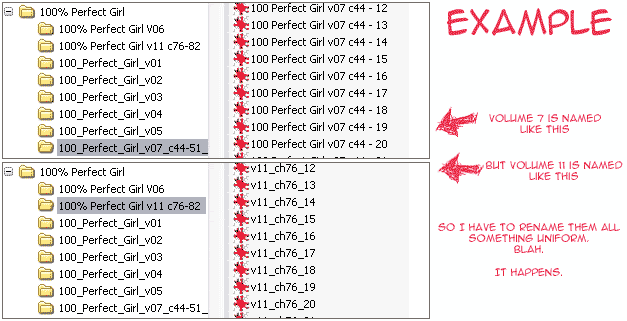
  2. Unzip it, be sure the files are in order, delete unwanted pages. Sometimes, when a manga has been scanlated by several different groups, these groups use different systems for naming the files (like this). If this is true and you just leave them like that, your chapters will end up out of order. Bulk rename them in IrfanView. Also, scanlation groups tend to put an ad for themselves and maybe some other stuff in with each chapter. There's nothing wrong with that, since their efforts are the only reason we have this manga available to us, but it's not necessary to include every ad in your end product. One at the beginning or end (or both) should be fine.
  3. Split double pages back into single pages. It's a pity because so many editors do such a lovely job of taking two pages and joining them into one big page. But it won't be useful to you on your ereader, so you'll have to split them back up.
  4. Resize the pages to 600 x 730. I hear that this is the best resolution for most ereader screens. Feel free to fiddle with it if you want; I've tried a few different sizes and have found 600 x 730 to be the best. If you skip this step entirely, your ereader will squish the image itself and it'll look like crunchy poop. Use IrfanView to resize. Like so:
    1. In IrfanView Thumbnails, select all of the images. Right-click and select Rename... The Batch conversion window will come up.
    2. Select the radio button for Batch conversion (or Batch conversion - Rename result files if you want to).
    3. Click the Options button. Drag the slider to change the save quality from the default 80 to 100, and check the box for Save as grayscale JPG. Click OK to go back to the Batch conversion window.
    4. Click the Advanced button. Under Resize, set the width to 600 and height to 730. Be sure the Preserve aspect ratio and Use Resample function boxes are checked and hit OK and then Start Batch.
  5. Convert the images to a single PDF. Just pop them into your selected conversion program, check the settings and hit the go button. In JPEG to PDF (the program I recommended above) be sure to select the radio button for Match Image Size + Margins.
    • Note: I have been unable to find a conversion program that is able to convert longer manga series--say, like, more than five volumes--into a single PDF. They simply seem to be unable to handle that many image files. In the cases of longer manga, you can just split them up into several PDFs.
  6. Upload the PDF to your ereader and enjoy.

Japan in Two Dozen Pictures

Tuesday, May 04, 2010

I have somehow managed to narrow down my 1,100+ photos from Japan down to twenty four. These represent the best of what I saw during my time in Tokyo and Kamakura. I'm already trying to plot out when I can go again. Traveling to other places suddenly seems less important.

Everything I researched and posted before going pretty much holds true. We did end up spending far less than expected on food, and far less than feared on train travel. Train travel for seven days between Narita Airport, all over Tokyo, and to Kamakura and back came out to... probably around $100. Food was cheaper than expected, about $10 a meal tops. We went out to a nice shabu shabu place once for $20, but that's it.

For more photos, check out my Flickr.

Love at first sight.

Most cherry blossoms had shed, but these were perfect.
(Ueno Park)

That's a big face.
(Ueno Park)

Cherry Blossom Massacre
(Ueno Park)

I dreamed of this moment.
(Asakusa)

Go to the center of the city and you'll find
an ancient temple in a beautiful forest.
(Meiji Jingu)

Hachiko still waits for his master.
(Shibuya)

Let's keep our priorities straight.
(Shibuya)

Our ryokan.
(Asakusa)

When I think "Akiba" I think of that building right here.
(Akihabara, AKA Akiba)

Being surrounded by a bright city and old temples
at once is amazing.
(Asakusa)

Buddha Buddies
(Asakusa)

Walking "home."
(Asakusa)

Samurai Masters
(Asakusa)

Tokyo Tower
(Minato)

Nothing like running into some classic Engrish. Sexy Fight!
Yes, that's a dude.
(Ueno Station)

Do you want your hotel room for 40 minutes or 60?
(Love Hotel Hill, Shibuya)

I have posted pictures of this building several times.
This picture I took myself, and it felt great to do it.
(Den-en-chōfu)

The temples of Kamakura are fantastic.
(Hase-dera Temple, Kamakura)

I have no desire to leave here ever.
(Hase-dera Temple, Kamakura)

Nothing in Japan is too serious to include some cuteness.
(Hase-dera Temple, Kamakura)

Can my backyard look like this someday? Please?
(Hase-dera Temple, Kamakura)

Poncho and his new BFF.
(Daibutsu AKA The Great Buddha, Kamakura)

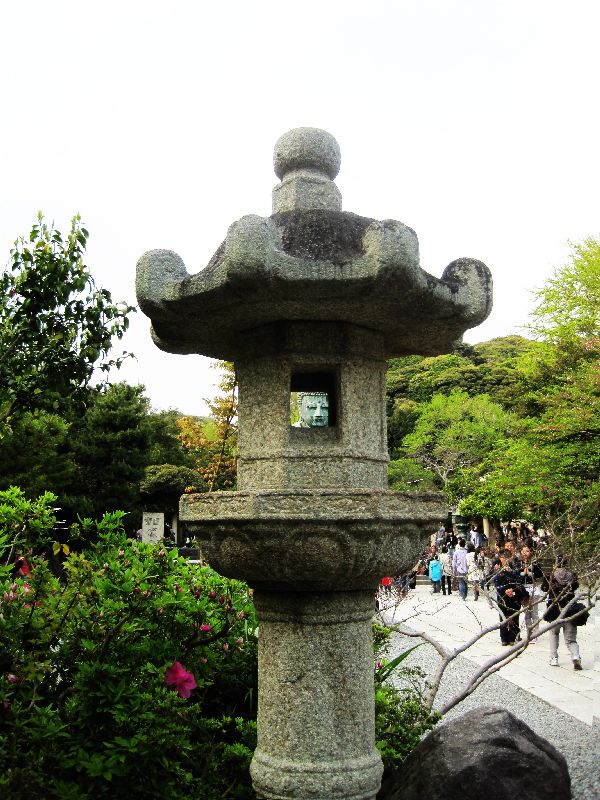
Peek-a-Buddha, by Poncho
(Daibutsu AKA The Great Buddha, Kamakura)
Related Posts Plugin for WordPress, Blogger...